AI Card Grading App for Card Collectors and Traders
Learn how an AI card grading app helps collectors scan cards faster, judge condition more consistently, and make smarter grading and buying decisions.
AI Card Grading App for Card Collectors and Traders
Valuable cards are often separated by tiny flaws that are easy to miss. A slightly soft corner, minor edge wear, or uneven centering can change a card from a strong grading candidate into a card that is better left raw.
That is why more collectors and traders now use an AI card grading app before they make a submission or buy a raw card. Instead of relying only on instinct, you can use your phone to scan a card, review the same four condition pillars professional graders use, and make faster decisions with less guesswork.
The goal is not to replace professional grading. The goal is to make the first decision easier. If you want the grading basics first, start with PSA grades explained. If you want a broader look at the shift from manual review to AI, read How AI is transforming card grading.
TL;DR
- AI card grading apps are best used for pre-grading before you pay for a professional submission.
- They help collectors scan cards faster and more consistently by checking centering, corners, edges, and surface.
- They are useful for both collectors and traders who need to sort collections, screen raw cards, or avoid weak submissions.
- The best workflow is AI scan first, sold-price research second, grading decision last.
- For eBay buying decisions, the figoca extension adds comps directly on the page so you can compare faster while browsing.
AI Card Grader
Know your card's grade before you submit
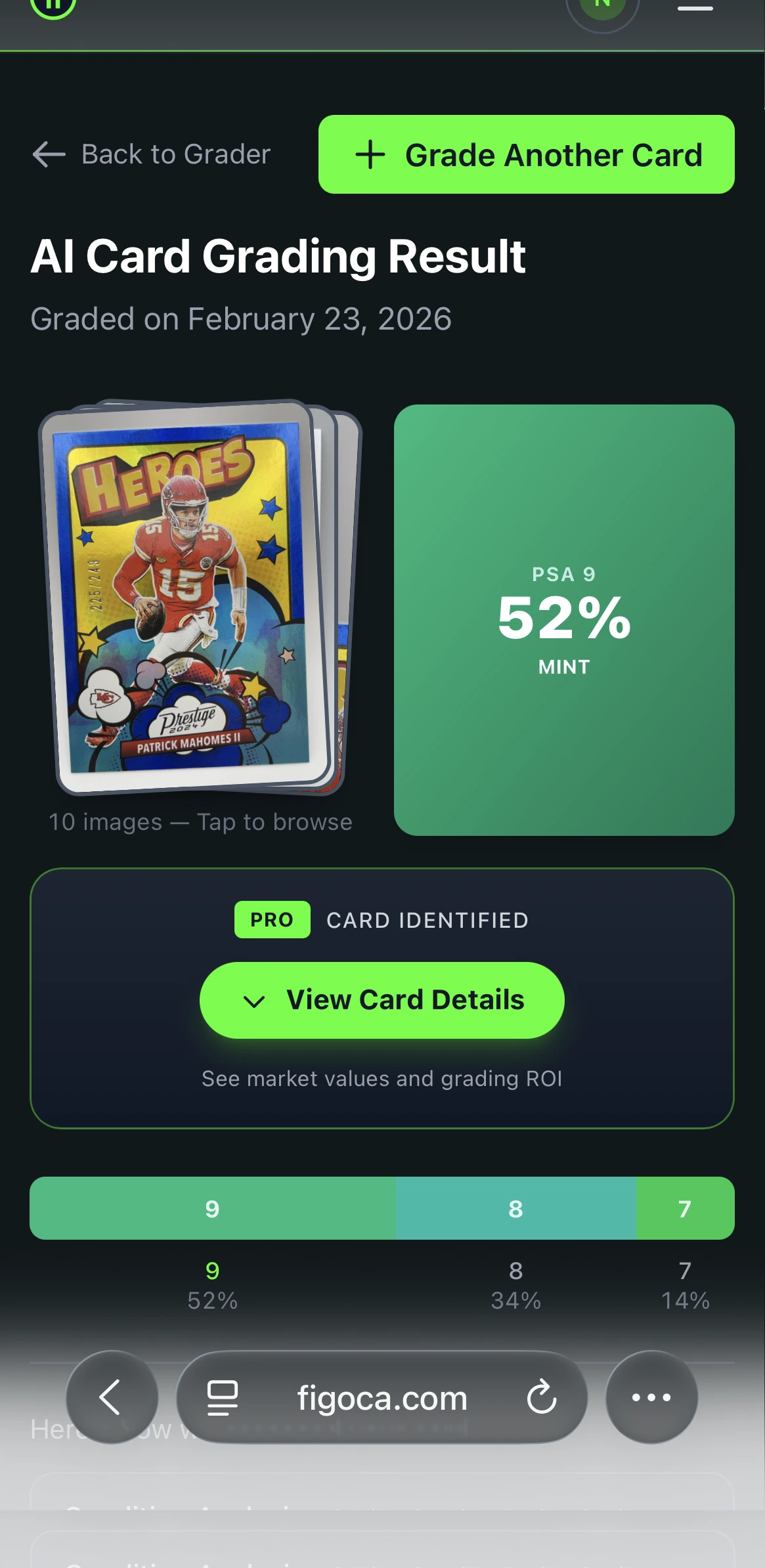
Snap a photo with your phone and get an instant AI-powered grade estimate. Check centering, corners, edges, and surface — just like the pros.
- Instant grade estimate
- Sub-grades for all 4 pillars
- Built-in ROI calculator
- Free to use
From manual grading to AI-assisted grading
Traditional grading depends on human review. Experienced graders can spot details that most collectors miss, but manual inspection is still slower, more expensive, and naturally limited by time and consistency.
AI changes that first step. A good app can review the same condition areas every time without fatigue or guesswork. That makes it especially useful when you are sorting a large collection, checking cards from a recent purchase, or deciding whether a raw card looks strong enough to justify grading fees.
Professional grading still matters because it provides official authentication, encapsulation, and a market-recognized slab. But before you get that far, AI can help you filter the cards that deserve a closer look. If you are already preparing a submission, pair this article with How to select cards to submit for grading and How to submit to PSA.
How advanced AI card grading apps work
The basic workflow is simple. You take a clear photo, the app isolates the card, and the grading model analyzes visible condition signals. Most tools focus on the same four pillars used in professional grading:
- Centering: how evenly the printed design sits inside the borders
- Corners: whether the corners are sharp or show rounding and wear
- Edges: whether the sides show whitening, chipping, or rough cuts
- Surface: whether scratches, print lines, dents, or gloss issues are visible
This is where AI can be a real advantage. It applies the same framework again and again, which helps reduce the inconsistency collectors run into when they rely only on the naked eye. If you want a second guide on how these scans work in practice, read AI Trading Card Grading Tool: Expert Card Grading App.
Features that matter most in the best AI grading apps
Not every app is equally useful. The best AI card grading apps do more than return a number. They make the grading process easier to understand and easier to act on.
Look for features like:
- Fast image capture and analysis so you can scan without friction
- Clear sub-grades for centering, corners, edges, and surface
- Support for different card types including sports cards and TCG cards
- Batch-friendly workflows for reviewing more than one card in a session
- Collection and reporting tools that help you track results over time
- Market context so you can connect card condition to real selling prices
That last point matters most. A strong pre-grade is only useful if you can compare it with real sales. That is why many collectors use figoca comps right after scanning to check what buyers actually paid.
Why collectors and traders use AI grading apps
For collectors, the appeal is confidence. You can sort cards faster, learn what flaws matter, and avoid sending weak candidates to a professional grader.
For traders and sellers, the appeal is speed. If you buy collections, scan raw cards, or shop active listings, an AI pre-grade helps you decide what deserves more attention and what should stay in the binder box.
The biggest advantages usually come down to four things:
- Improved grading consistency
- Faster review of large collections
- Lower risk of wasting grading fees
- Better buying and selling decisions
If you still use the old shortcut of grading only when a card seems expensive enough, read Should you grade that card? EV beats the $80 rule. It is a better framework than relying on gut feel alone.
The best tools for automated card grading and eBay research
The strongest workflow is not just an app. It is a stack of tools that help you move from condition review to market decision.
Start with the figoca AI card grading app to get a fast pre-grade. Then check recent sold prices on figoca comps. If you are shopping on eBay, download the figoca extension or read how the figoca extension shows trading card comps directly on eBay.
That combination helps you answer three practical questions fast:
- Is this card strong enough to consider grading?
- What have similar cards actually sold for recently?
- Is this eBay listing priced well enough to buy now, offer, or skip?
Step-by-step guide: grading your cards with AI
Grading with AI is easy, but clean inputs matter. A better scan leads to a better estimate.
1. Prepare the card
Use a clean raw card without a sleeve or top loader. Wipe away dust gently and make sure the surface is easy to photograph. If you want better storage habits before you start scanning, read Which cards should you sleeve?.
2. Use even lighting and a plain background
Place the card on a dark, flat background and avoid glare. Hold the phone directly above the card so the proportions stay true and the corners remain visible.
3. Upload or scan the image
Follow the app prompts, center the card in the frame, and capture a sharp image. The app will analyze the visible condition signals in seconds.
4. Review the report
Look at the overall estimate, but focus on the sub-grades too. A card with one weak area can still miss the grade you hoped for. This is where AI becomes useful as a screening tool instead of just a novelty score.
5. Compare the result with market data
After you scan, check sold listings with figoca comps and run the numbers with the EV grading calculator. That is the best way to decide whether the card is worth grading, holding, or selling raw.
Security, privacy, and collection data
Collectors want speed, but they also want control over their information. A strong grading app should make scanning simple while still handling images, grading reports, and collection data responsibly.
The most useful data features usually include:
- Secure storage of scans and grading reports
- Reliable backups or retrieval options
- Clear collection tracking over time
That matters because grading is rarely a one-time action. Many collectors review the same cards again later, compare condition notes across multiple scans, or track which cards moved from raw to graded inventory.
Marketplace, social, and community integrations
AI grading becomes more useful when it connects to the rest of the hobby. Marketplaces help you compare real sales. Community spaces help you learn faster. Social sharing can make it easier to show scans, results, and pickup wins to other collectors.
For most collectors, the marketplace side matters most. When you combine a pre-grade with live comps, you stop treating grading as a mystery and start treating it like a decision. That is especially useful if you buy cards on eBay and want quick context before you commit. The figoca extension article shows how that works during live browsing, and the download page takes you straight to the extension install flow.
The future of AI in card grading
AI grading tools will keep getting better at spotting subtle flaws, organizing scans, and connecting condition data with real market behavior. That should make collecting easier for newcomers and faster for experienced hobbyists.
The biggest long-term value is not just automation. It is clarity. When you can scan a card quickly, understand why it graded the way it did, and compare that result with real sales, you make better decisions across the whole hobby.
Final thoughts
An AI card grading app is one of the most practical tools a collector can use today. It helps you review cards faster, understand condition more clearly, and avoid costly mistakes before you submit or buy.
Used on its own, AI gives you a stronger first opinion. Used together with figoca comps, the EV grading calculator, and the figoca extension on eBay, it becomes part of a smarter collecting workflow built around real data instead of guesswork.
Related guides
- How AI is transforming card grading
- AI Trading Card Grading Tool: Expert Card Grading App
- Top AI Card Grading Apps: Streamline Your Collection
- How to select cards to submit for grading
- PSA grades explained
- How to submit to PSA
FAQ

Card enthusiast, figoca founder, and independent software developer
Nico is a card enthusiast who built figoca after running into the same problems many collectors face: uncertain pre-grading decisions, too much tab switching for comps, and no fast way to price cards on the go. He is also a big Kansas City Chiefs fan (❤️💛), follows the Kansas City Royals (💙), and enjoys Formula 1 and Golf.
- Sports Card enthusiast
- Founder of figoca
- Independent software developer with a TypeScript and AWS background