Discover how artificial intelligence is changing card grading by helping collectors evaluate condition, scan cards using smartphones, and identify valuable collectibles faster and more accurately.
How AI is Transforming Card Grading
That box of Pokémon or baseball cards you keep in your cupboard could be a goldmine, or just a pile. The main difference is due to a few tiny defects that you cannot see with the naked eye, transforming an item that could be a treasure into a typical collectible.
For decades, determining a card's true condition was an expert's game. A tiny bit of wear on a corner or a print that's just a millimeter off-center can be the difference between a card worth $50 and one worth $5,000. In practice, judging these details—the centering, corners, edges, and surface—is a skill that takes years to develop.
But what if you no longer need to be a seasoned professional to get a quick and reliable assessment? A new wave of technology is making this possible, giving everyday collectors the same advantage as the pros by showing you exactly how to scan sports cards for condition right from your phone.
This is where the figoca app, an AI card grading app, comes in. It's a fast, easy tool that puts an AI-powered expert right in your pocket, acting as a free sports card value scanner that focuses entirely on condition. It can help you finally sort your collection and find the hidden gems.
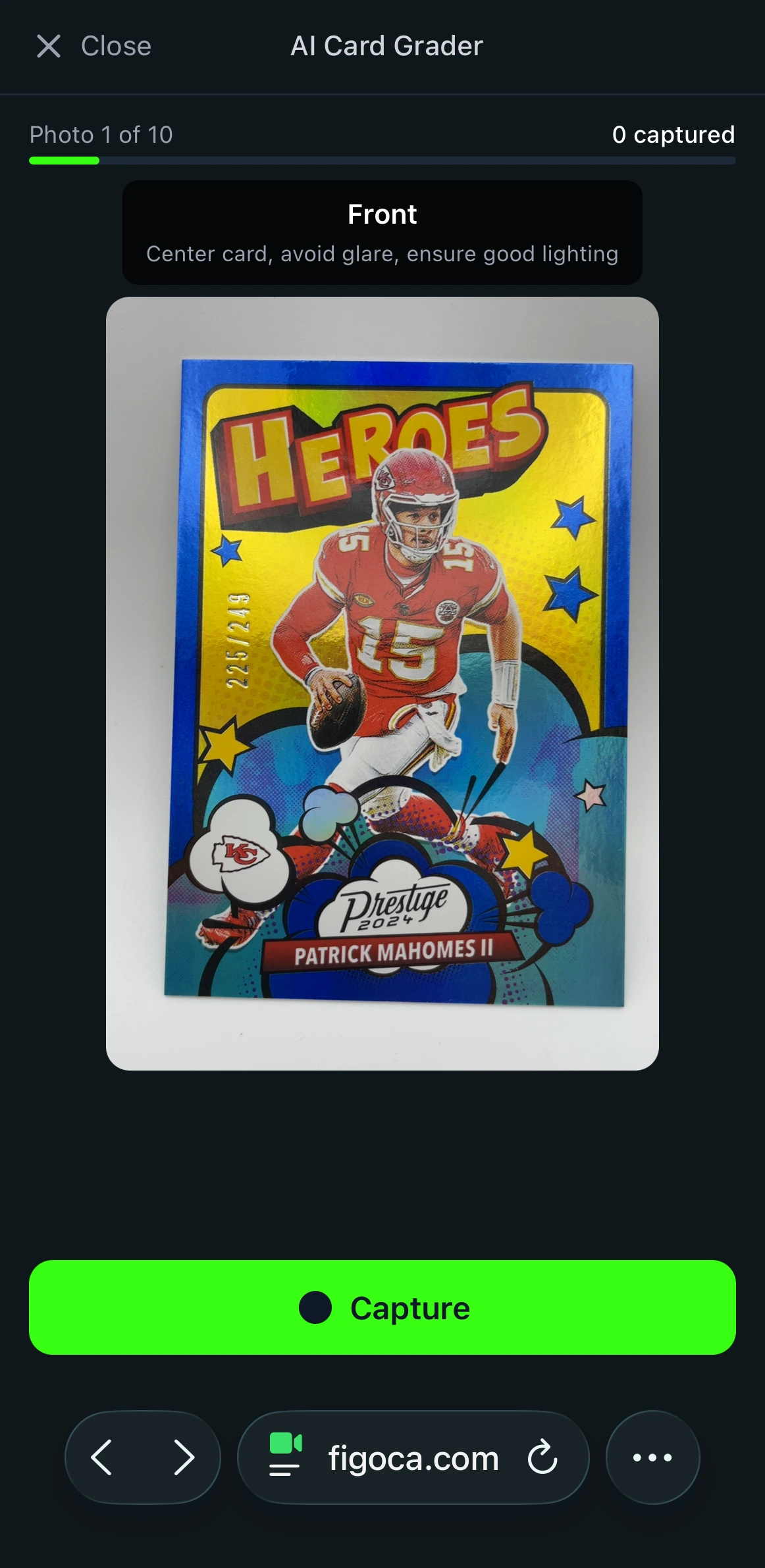
Summary
AI-powered pre-grading apps like figoca use your phone to analyze centering, corners, edges, and surface—mirroring professional graders—to deliver instant, data-backed condition estimates. This quick screening helps you sort collections, identify which cards are worth sending to PSA/BGS, and avoid costly submissions on flawed cards. The article explains how the AI is trained, how to scan for best results, how to read sub-grades, and when to use AI pre-grading versus professional certification. Together, AI pre-grading and pro-grading complement each other to maximize value while saving time and money.
What is Pre-Grading? A Smart First Step Before Spending Hundreds on PSA
So you found a card you think is valuable. Many collectors consider sending it to a professional grading company like PSA to get it authenticated and sealed in a protective case. The problem is that sending a single raw, or ungraded, card for this service can cost a lot and take months, only for you to discover a tiny flaw that drops its grade and value. It's a gamble.
This is where pre-grading comes in. Think of it as a quick, affordable check-up for your card before committing to the real thing. When you use an app like figoca to get a pre-grade for my trading cards, it uses your phone's camera to scan the card and provide an instant card grading report. This report gives you a strong, data-backed estimate of the grade it would likely receive from professionals, helping you understand the key differences in AI card grading apps vs PSA's final, official certification.
A pre-grading app is most useful when you need a quick, reliable answer. It's the perfect tool for:
- Sorting a large collection to instantly find the cards in the best condition.
- Deciding if a specific card is worth the high cost and long wait of professional grading.
- Getting a fast second opinion on a raw card you're thinking about buying online.
An AI pre-grade helps you make smarter decisions. It's not meant to replace the official slab from an expert; it's designed to be a powerful screening tool that saves you time and money by helping you decide which cards are actually worth an expert's time. The AI inspects your card for the same things human graders do.
The Four Pillars of Card Grading: What AI and Humans Look For
Professional grading doesn't have to be a complicated art, but rather a meticulous and consistent process of inspection. Human experts as well as the figoca AI are trained to search for the same elements with a focus on four important aspects that define the condition of a particular card and, in the end, its value. Consider them as four foundations that make the card's quality.
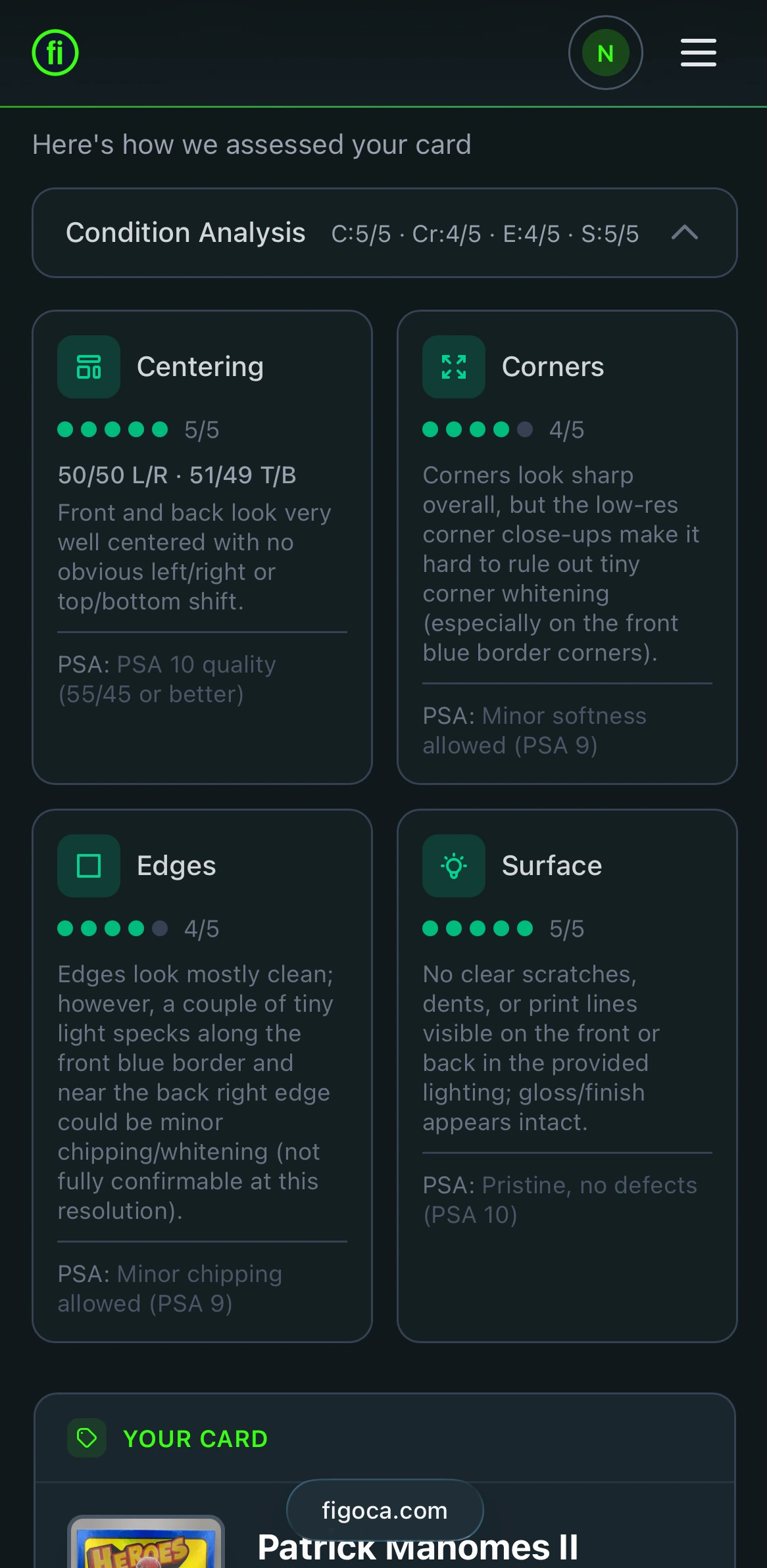
- Centering (The Frame): The initial and most obvious aspect is the centering of the card. Imagine the work is a photograph and the borders are the frame. Does the image sit in the middle, or has it been moved to one side? A card with equally balanced borders across each side shows great centering. If you're trying to find the best application to verify the centering of your card, you'll need one that measures the borders in a precise manner because even a tiny shift could affect the quality.
- Corners (The Points): The next step is to have an inspector, be it human or AI, focus to the 4 corners. A perfect corner should be straight and unbroken just like the fresh edge of a pencil. Any indication of wear, like rounding (often known as "soft" corner), peeling or bending can lower your score. The AI will look for any deviation from a sharp 90-degree angle to look at the corners and edges of cards.
- Sides (The Edges): Just as important as the corners are edges of the card. If a card is in good condition, the edges are smooth and will have uniform color. This is often referred to as "whitening," where the upper surface of the card has damaged or chipped away, leaving the white stock of paper underneath. This is typical of the older card stock that was frequently handled or shuffled.
- Surface (The Finish): Finally, the entire surface of the card is examined with lighting. These are the places where small imperfections may be hidden. Scratches, scuffs, prints that are damaged, fingerprints (like an ink speck or line), or even tiny scratch marks are important in determining the condition of your card's surface. A card may appear great at a glance, however, one scratch on the holographic art could mean the difference between an ideal 10 or 9.
A card is only eligible for the sought-after "Gem Mint" status if it's nearly perfect across the four categories. But how does a smartphone application really detect these weaknesses? This is where the ability of AI comes into play.
How Can an App "See" Your Card's Flaws? The Magic of AI Explained Simply
It may seem futuristic, with phone apps capable of detecting even microscopic scratches, but figoca's card grading AI works surprisingly simply: think of it not as an intelligent machine but as a learned apprentice trained by experts studying an entire library of cards.
It wasn't just any library; rather, this AI was trained on hundreds of high-resolution images graded by professionals at PSA and trained through analysis to recognize subtle variations between perfect 10 corners and soft 9 corners and memorize exactly what 60/40 centering looks like compared to perfect 50/50. Essentially, it created a huge visual database containing each flaw grade by grade in an image file.
When you scan your card, the AI isn't guessing. It's performing a lightning-fast comparison, matching the details of your card against the thousands of graded examples it has already memorized. The question of AI card grading app accuracy comes down to the quality of its training, and by learning from real-world expert decisions, the app can deliver a remarkably reliable estimate.
Your First Scan: A 3-Step Guide to Getting an Instant Grade Report
Using the figoca app is as simple as taking a photo, giving you a powerful analysis without any complicated setup. You can go from having a mystery card to holding an estimated grade in under a minute.
- Create a clean environment: Your first step is to find a flat, dark-colored surface like a piece of construction paper and make sure you have good lighting. This simple prep work helps your phone's camera see the card's edges and surface perfectly. There's no need for special equipment; a well-lit desk is all you need for this guide to using a card scanner app.
- Scan your card: With your card in place, open the figoca app. You'll see a camera view with a simple outline of a card. Just position your phone so your card fits inside the on-screen guides. Hold it steady and tap the scan button. The app instantly captures the image and sends it to the AI for analysis. This is the magic of mobile card grading in action, the entire process is over in a flash.
- Get your results: The analysis is complete and your report is ready in just a few seconds. The app will show you an overall estimated grade and a breakdown of each grading factor.
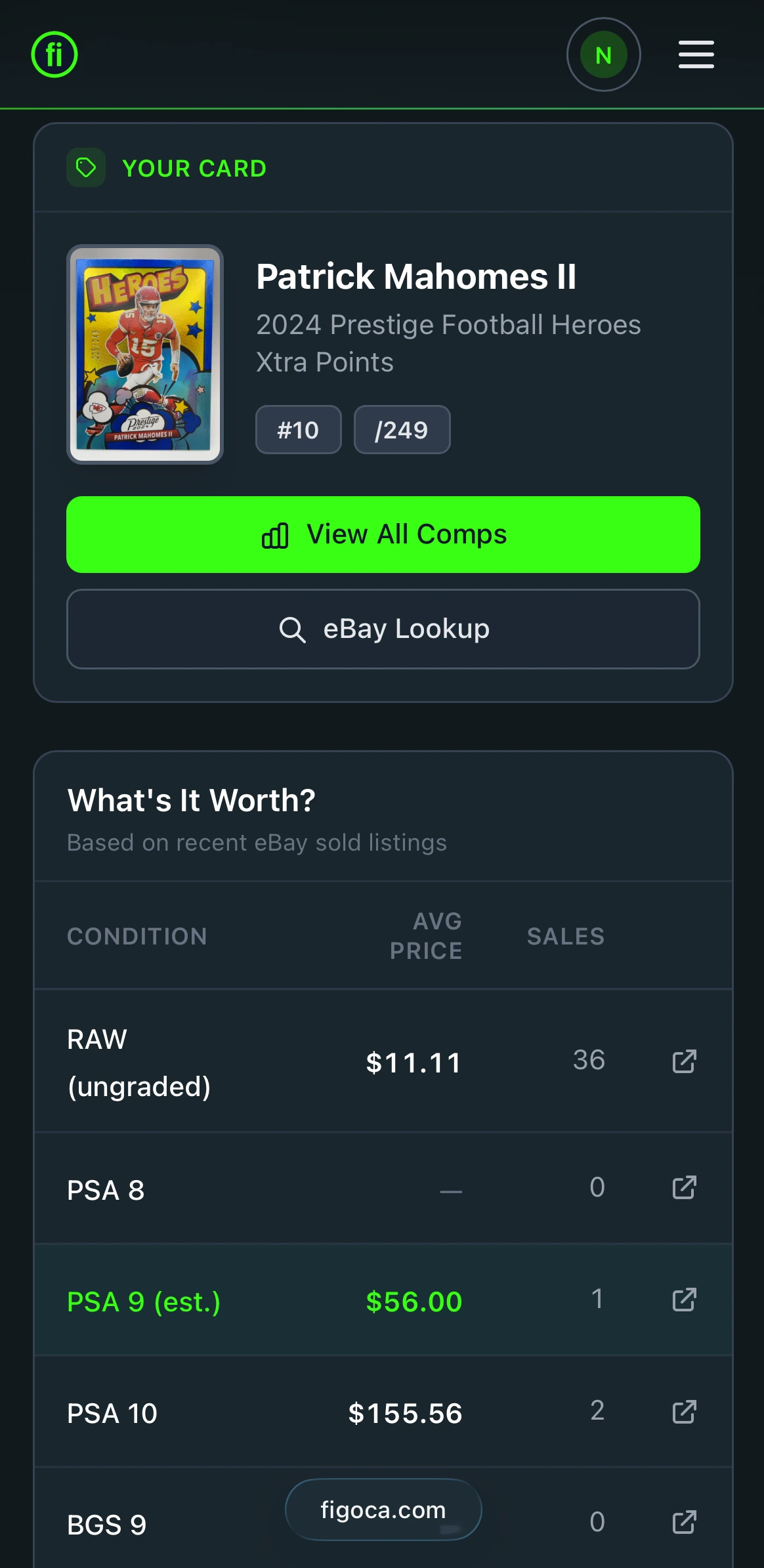
How to Read Your AI Grade Report
After scanning, the screen is lit up with your instant assessment report. The first thing you'll see is the number that's on the top of the screen. This is the total estimated grade. Imagine this as your final grade, a brief description of the card's condition according to the traditional 1-to-10 scale. A score that is high, like a 9 or 10, indicates that your card is in excellent condition, whereas a lower score suggests obvious wear.
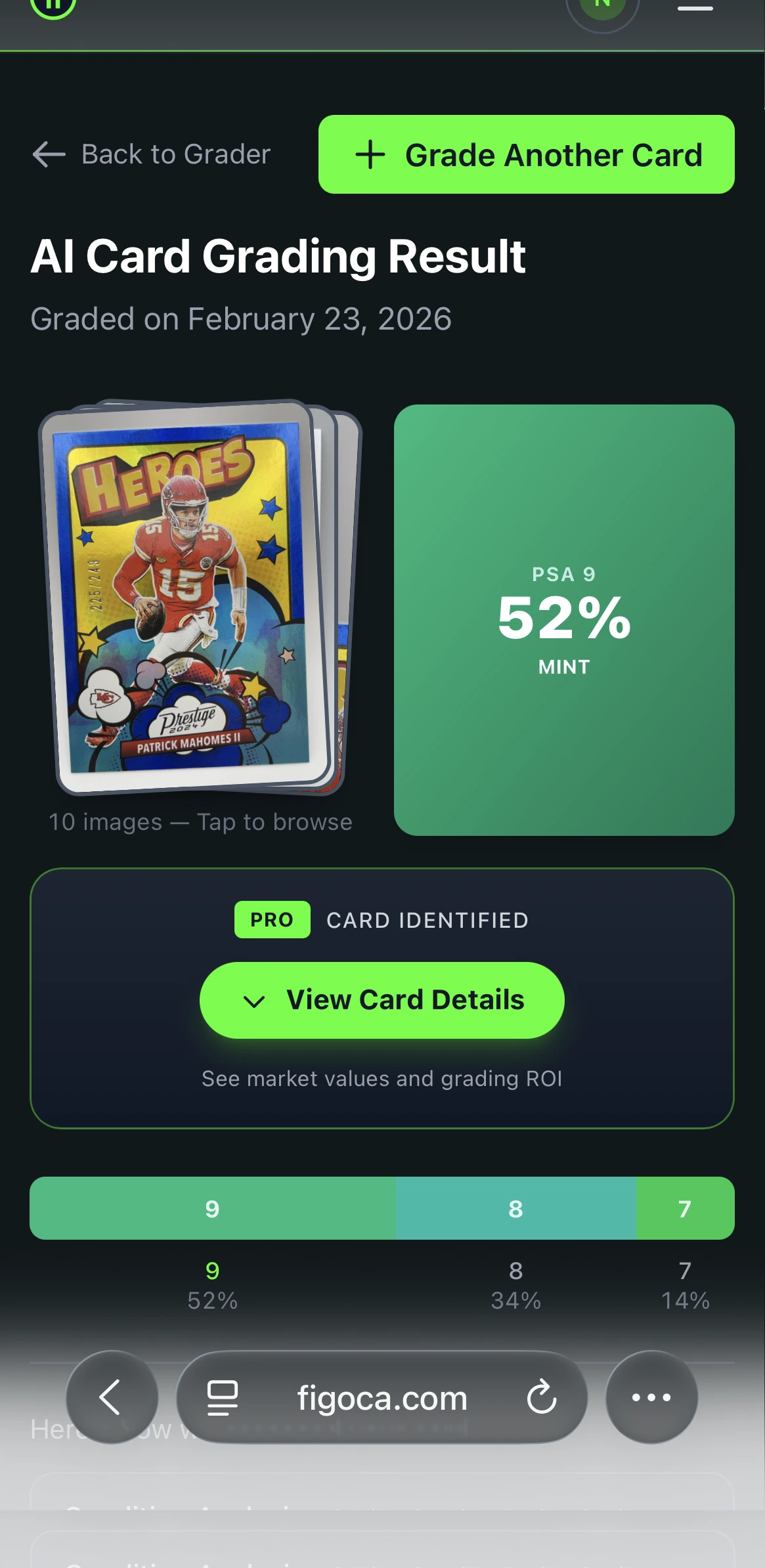
However, the true power of this card analysis tool is in the finer details below the sub-grades. The AI does not just provide you with a final score but reveals the process that led to this score by scoring every one of these four elements independently. For instance, the card you have might have nearly perfect 9.5 Centering, but a weaker 8.5 for Corners. This report reveals the strengths and weaknesses, transforming an unsubstantiated sense that your card is in good condition.
This information helps you make smarter decisions. Let's say your old holographic from a Pokemon card condition scanner online search comes back with an overall 9.2, with no sub-grade dipping below 9.0. This is a green light, a strong signal that the card is a prime candidate for professional grading, where it could fetch a significantly higher price. Conversely, if the report shows a 6.5 due to a scratched surface, you've just saved yourself time and money.
The figoca app acts as your trusted first opinion. It gives you an incredibly educated estimate to help you sort your collection and spot potential treasures before committing to the cost and wait of official grading.
AI Pre-Grading vs. Professional Grading: Knowing the Right Tool for the Job
If an AI can give you a grade in seconds, why bother with professional services like PSA? Think of it this way: the figoca app is like getting an expert's instant opinion, while professional grading is like getting a formal, legally recognized certification. One is a brilliant estimate; the other is a permanent, market-accepted verdict.
Professional grading goes a crucial step further than a digital scan. When you send a card to a company like PSA or BGS, they don't just assign a grade. They authenticate the card and then encapsulate it in a sonically sealed, tamper-proof plastic case, often called a "slab." This slab permanently protects the card and displays a label with its guaranteed grade, creating a certified collectible. An AI scan offers a highly accurate preview of that grade, but it can't provide the physical certification that locks in a card's value.
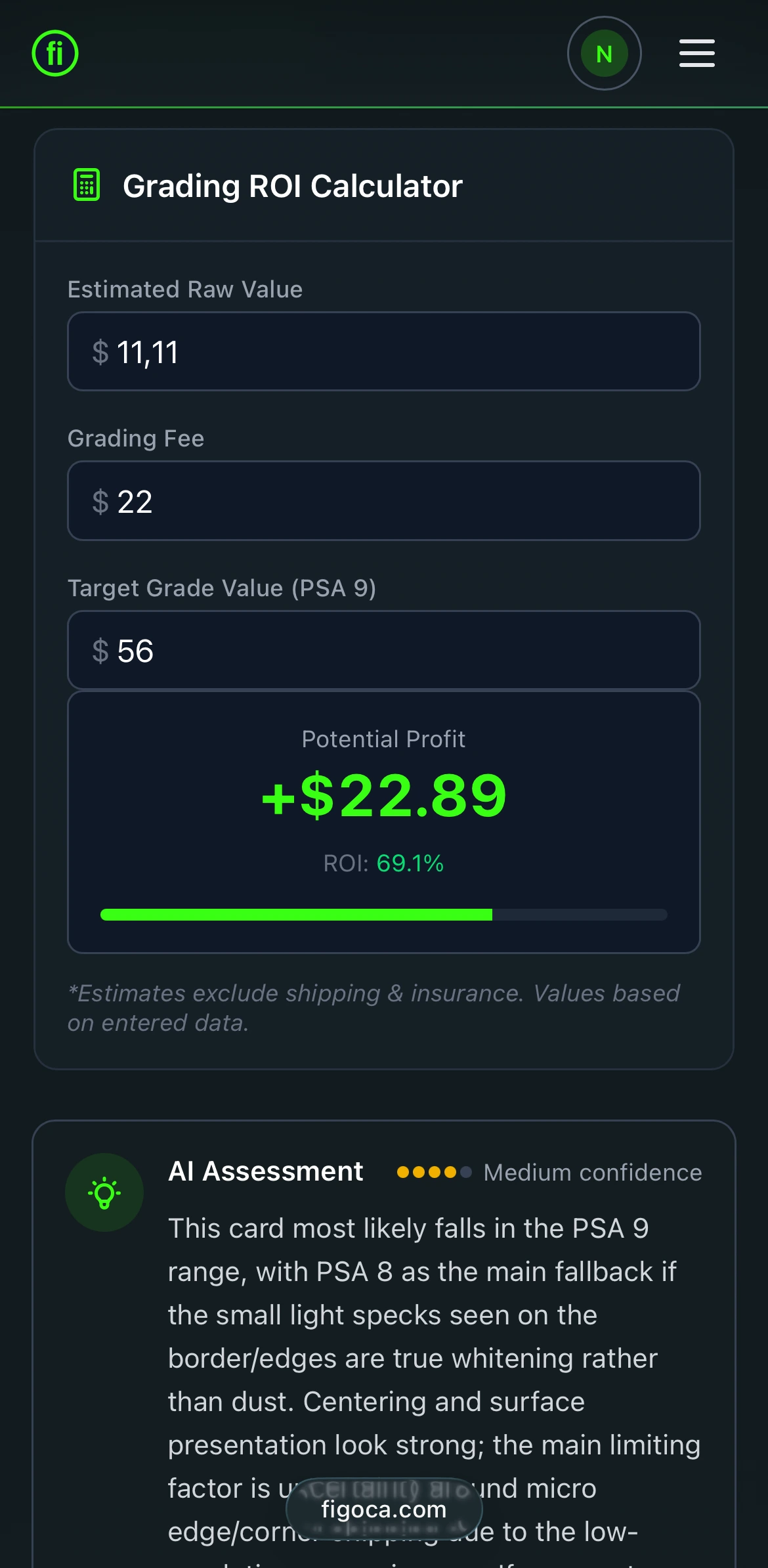
This brings up a common question: is an AI card grading app accurate? For its intended purpose, helping you make fast, low-cost decisions, it's incredibly effective. The AI is accurate enough to tell you if a card is a strong candidate for a high grade, or if it has flaws that will prevent it from getting a top score. It's a powerful sorting tool, not a replacement for the final judgment.
The two services are designed for different moments in your collecting journey. They work together to save you time and money.
Use an AI App (like figoca) for:
- Quickly sorting through a large collection to find gems.
- Deciding if a card is worth the cost of professional grading.
- Getting a fast second opinion on a card you want to buy online.
Use a Pro Grader (like PSA) for:
- Officially certifying your most valuable cards.
- Maximizing the resale value for a key card.
- Ensure long-term protection and preservation.
These tools are not competitors, they are partners. Using an AI card grading app first is the smartest way to filter your collection, ensuring you only spend time and money sending your very best cards for official certification.
AI Card Grader
Know your card's grade before you submit
Snap a photo with your phone and get an instant AI-powered grade estimate. Check centering, corners, edges, and surface — just like the pros.
- Instant grade estimate
- Sub-grades for all 4 pillars
- Built-in ROI calculator
- Free to use
Start Your Treasure Hunt Today
The shoebox full of cards doesn't have to be a mystery. You know the essential elements of grading—centered edges, corners, and surfaces—and you are equipped with a tool to observe them through the eyes of an expert. Moving from guessing to understanding can save you time and money.
Instead of waiting for months and paying hefty costs only to find yourself dissatisfied, you can get an instant, data-driven decision. The figoca application helps you determine what cards are worth sending to professionals for grading and which ones are better stored in a binder. Your treasure hunt can start right now. Try the figoca AI card grading app, grab that first card, and see what gems you can uncover today.
FAQs
Centering: Whether the borders are evenly balanced around the artwork.
Corners: Sharpness and integrity of all four tips (no rounding, bends, or peeling).
Edges: Uniform, smooth sides without whitening or chipping.
Surface: Overall finish under light, checking for scratches, scuffs, print defects, fingerprints, or dents. A card only approaches "Gem Mint" if it's essentially flawless across all four.
Use AI (e.g., figoca) to sort collections quickly, identify potential high-quality candidates, and quickly get second opinions about potential purchases.
Use professional graders (e.g. BGS or PSA) for authentication, encapsulation in a tamper-proof slab, and to get a market-recognized, permanent certificate that increases resale value and provides long-term security.
The instant report will show an overall estimate of 1-10, as well as sub-grades for each of the pillars. Use the sub-grades to identify strengths and weak points (e.g., 9.5 Centering, 8.5 Corners) and decide on the next step. Balanced, strong sub-grades usually indicate a great candidate for professional grading. An unsatisfactory sub-grade (like scratched surfaces) could help you avoid the expense of submitting.

Card enthusiast, figoca founder, and independent software developer
Nico is a card enthusiast who built figoca after running into the same problems many collectors face: uncertain pre-grading decisions, too much tab switching for comps, and no fast way to price cards on the go. He is also a big Kansas City Chiefs fan (❤️💛), follows the Kansas City Royals (💙), and enjoys Formula 1 and Golf.
- Sports Card enthusiast
- Founder of figoca
- Independent software developer with a TypeScript and AWS background