Discover the AI trading card grading tool that gives instant card estimates from your phone. Scan faster, sort smarter, and try it now.
AI Trading Card Grading Tool: Expert Card Grading App
You might think your old Charizard is in pretty good shape. The hard truth is that what looks almost perfect to most collectors can still be only a 6 out of 10 to a professional grader. That difference can completely change what the card is worth.
That is why an AI trading card grading tool is so useful. Instead of relying only on instinct, you can use your phone to scan a card and get a fast, structured estimate based on the same core grading pillars used by professionals.
Professional grading still matters. But before you spend money on a submission, AI can help you understand whether a card looks like a real candidate or just a card with strong eye appeal at first glance.
TL;DR
- AI grading tools are best used for pre-grading before you submit to PSA or BGS.
- They inspect centering, corners, edges, and surface from a photo on your phone.
- They help you sort collections faster and avoid weak submissions.
- They work best when paired with sold-price research on figoca comps and the EV grading calculator.
- They do not replace official slabs from professional grading companies.
What the AI is actually grading
When a grader looks at a card, they are not grading "the vibe." They are grading condition. In practical terms, that usually comes down to four main areas:
- Centering
- Corners
- Edges
- Surface
Even one small flaw can drop a grade. A card may have sharp edges but be printed off-center. A vintage card may look clean until you notice one soft corner. A holo might appear strong until angled light reveals surface scratches.
If you are new to these standards, read PSA grades explained first. It gives useful context for what a 1 through 10 score really means.
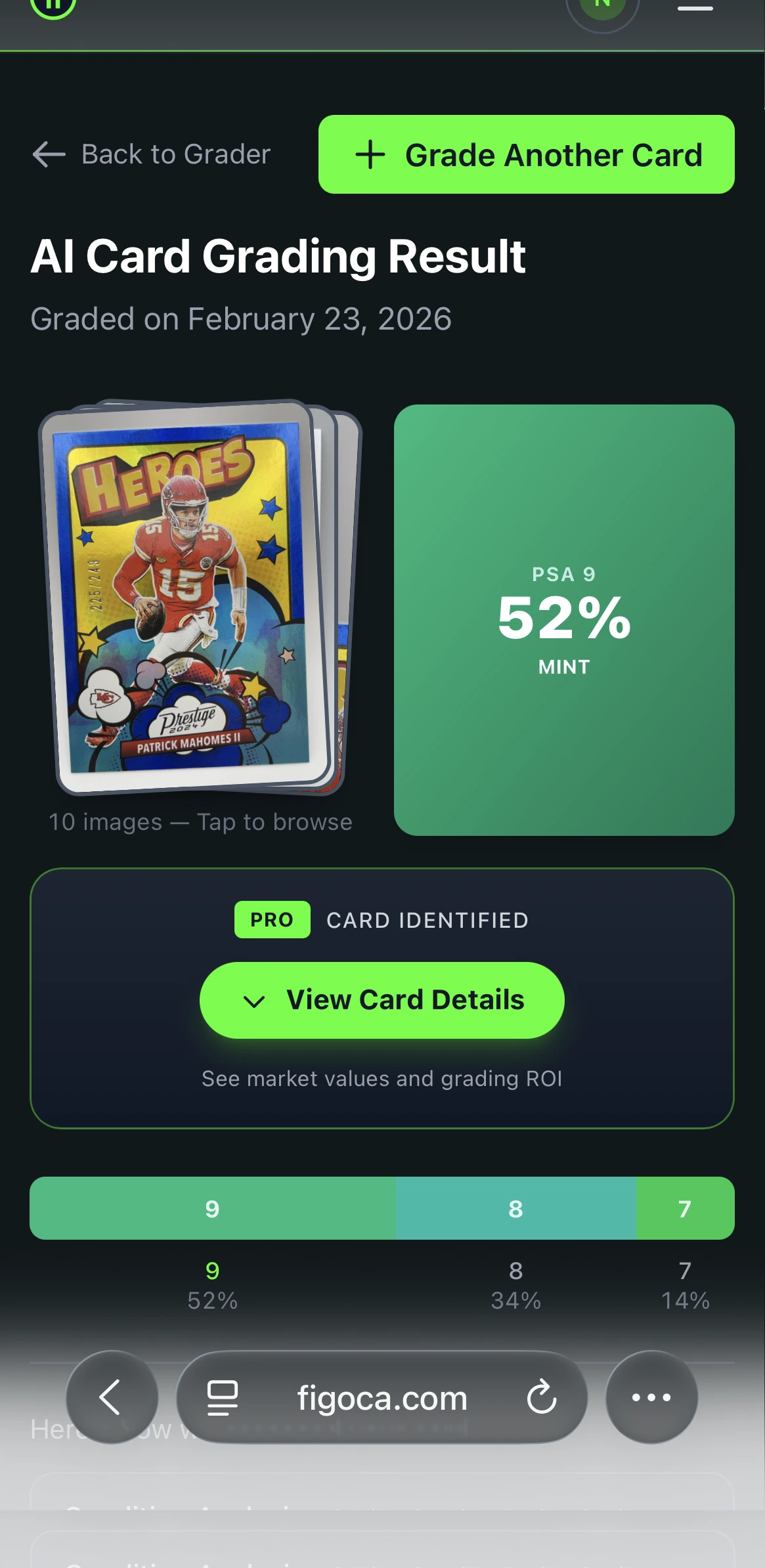
With the figoca AI card grading app, you can scan a card and get a fast estimate built around those same four pillars.
AI Card Grader
Know your card's grade before you submit
Snap a photo with your phone and get an instant AI-powered grade estimate. Check centering, corners, edges, and surface — just like the pros.
- Instant grade estimate
- Sub-grades for all 4 pillars
- Built-in ROI calculator
- Free to use
How does an AI card grader online actually work?
It is not magic. It is computer vision.
An AI card grader does not "see" a Charizard or a rookie card the same way a person does. It sees shapes, edges, borders, contrast, reflections, and inconsistencies across the image. That makes it good at spotting measurable condition signals that many collectors miss when they inspect cards casually.
The basic process looks like this:
- You take a clear photo of the card.
- The software identifies the card area and measures its geometry.
- It analyzes centering, corners, edges, and surface signals.
- It compares what it sees to patterns learned from a large set of graded examples.
- It returns an estimated grade and condition breakdown.
That is why these tools are best understood as digital specialists. They apply the same framework every time, without fatigue, mood, or guesswork.
If you want a broader introduction to AI pre-grading, also read How AI is transforming card grading.
A closer look at the four things the AI scans for
Centering
For centering, AI measures the borders instead of guessing. It checks how balanced the printed design is from left to right and top to bottom. This is where a good app can be much more consistent than the human eye, especially on borderline cards.
Corners
Corners are one of the easiest ways to lose a grade fast. The AI looks for rounding, softness, fraying, and tiny signs of wear. On dark-bordered cards, even a small amount of whitening can matter.
Edges
Edges tell you a lot about handling and storage. The app looks for whitening, chipping, rough cuts, and wear that is hard to notice at normal viewing distance.
Surface
Surface is often where strong-looking cards fall apart. AI looks for scratches, print lines, dimples, scuffs, dents, and gloss problems that show up when light hits the card unevenly.
If you want a practical in-hand workflow after the scan, use How to select cards to submit for grading.
How to get your first AI card grade in under 60 seconds
The process is simple, but photo quality matters.
Start in a bright room without direct sunlight. Put the card on a dark, non-reflective surface such as a black mousepad or dark cloth. Then open the figoca AI card grading app and follow the on-screen guides.
The usual workflow looks like this:
- Place the card on a dark, flat background.
- Open the scanning feature in the app.
- Align the card inside the camera guides.
- Hold the phone flat and steady.
- Take the photo and wait for the analysis.
Within seconds, you get a predicted grade plus a breakdown of centering, corners, edges, and surface. That makes the tool especially useful when you are reviewing a large collection and need fast first-pass decisions.
AI vs. human graders: when to trust your phone and when to call the pros
An AI grade is best understood as an educated estimate, not a market-final verdict.
That is where professional companies like PSA and BGS still matter. Human graders can inspect cards in hand, authenticate them, and seal them in a slab that buyers trust in the market. That official certification is what creates a resale-ready result.
But professional grading is expensive and slow. That is why smart collectors use AI before they submit.
- Use AI when you need speed and want to sort cards quickly.
- Use AI when you want to screen a large collection before spending grading fees.
- Use professional grading when you need official authentication and a slab.
- Use professional grading when the card is important enough that resale value depends on the final certified grade.
There is no real fight between AI and human grading. They work best together. AI helps you narrow the field. Professional grading makes the final call.
If you are preparing a real submission, pair this article with How to submit to PSA and Should you grade that card? EV beats the $80 rule.
Three photo mistakes that ruin AI grading results
The quality of the estimate depends on the quality of the photo. These are the most common mistakes collectors make.
1. Scanning through a sleeve or top loader
This is the biggest one. Scratches, smudges, and glare on the plastic can be mistaken for flaws on the card itself. For the best result, always scan the raw card.
2. Taking a blurry photo
AI needs detail. A soft image can hide print lines, tiny white edge specks, and small surface defects. Hold the phone steady and make sure the card is in focus before you capture the image.
3. Shooting at an angle
If the photo is angled, the card can look distorted and the app may misread centering. Keep the phone directly above the card and parallel to the surface.
Getting these three things right makes a huge difference. A clean, honest photo gives the AI the best chance to return a reliable estimate.
If you want better card handling habits before scanning or submitting, read Which cards should you sleeve?.
What to do next: a 3-step AI grading plan
Once you understand what the app is checking, the next step is simple.
- Gather: Pull out a handful of your most promising cards.
- Scan: Use the figoca AI grader to get a quick estimate for each card.
- Sort: Make a high-potential pile and a collector pile based on the results.
That process helps you learn faster and spend smarter. Instead of guessing which cards deserve grading fees, you start with a filtered list. Then you can check sold prices on figoca comps, run the math with the EV grading calculator, and decide whether the submission still makes sense.
The box of cards in your attic does not have to stay a mystery. With a good AI trading card grading tool, the difference between a weak card and a strong candidate becomes easier to see. That is how collectors move from hopeful guesses to confident decisions.
Related guides
- How AI is transforming card grading
- PSA grades explained
- How to select cards to submit for grading
- How to submit to PSA
- Should you grade that card? EV beats the $80 rule
FAQ

Card enthusiast, figoca founder, and independent software developer
Nico is a card enthusiast who built figoca after running into the same problems many collectors face: uncertain pre-grading decisions, too much tab switching for comps, and no fast way to price cards on the go. He is also a big Kansas City Chiefs fan (❤️💛), follows the Kansas City Royals (💙), and enjoys Formula 1 and Golf.
- Sports Card enthusiast
- Founder of figoca
- Independent software developer with a TypeScript and AWS background