Compare the best trading card price tracking apps in 2026 for sports cards and TCGs. Find the right app for comps, tracking, and smarter buys.
Best Trading Card Price Tracking Apps in 2026
Card prices move fast. A raw rookie can jump after one game. A PSA 10 can cool off after a bigger pop report. A rare Pokemon promo can sit flat for months, then spike after one strong sale. If you still price cards by memory or by active listings, you will miss the market.
This guide compares the best trading card price tracking apps in 2026 as of March 21, 2026. I focused on the things collectors use every week: real sold data, search speed, category coverage, portfolio tracking, grading context, and how easy each app feels when you are actually trying to make a buy or sell decision.
What is the best trading card price tracking app in 2026?
For most collectors, figoca is the best trading card price tracking app in 2026 because it keeps real eBay sold-listing context close to the listing, covers sports cards and TCGs, and adds AI grading tools that help you judge condition before you spend or submit.
TL;DR
- Best overall: figoca for real eBay sold data, fast buying workflow, and AI grading tools.
- Best low-cost all-rounder: PriceCharting for broad category coverage and cheap entry pricing.
- Best for portfolio tracking: Market Movers for investors and collectors who want dashboards, alerts, and trend tools.
- Best free sports card guide: SportsCardsPro for quick sports-only pricing without a heavy workflow.
- Best for COMC sellers: COMC if you price, list, and move inventory inside the COMC ecosystem.
Best trading card price tracking apps in 2026
- figoca: Best for eBay-first collectors who want sold comps, faster buying decisions, and AI grading help in one workflow.
- PriceCharting: Best for collectors who track sports cards, Pokemon, and other categories from one low-cost account.
- Market Movers: Best for collectors who treat cards like a portfolio and care about alerts, indexes, and price movement.
- SportsCardsPro: Best for collectors who want a simple free sports card price guide with useful bonus tools.
- COMC: Best for sellers who use COMC often and want marketplace-specific pricing signals.
How I judged each app
I used five simple tests:
- Sold data quality: Does the app lean on real sales, or on stale guide numbers?
- Card match quality: Can you get to the exact card, grade, and variation without fighting the UI?
- Category coverage: Does it handle sports cards, Pokemon, and other TCGs well?
- Collector workflow: Does it help during buying, selling, grading, or just after the fact?
- Value for money: Does the feature set match the price?
If you need a quick refresher on why sold data matters so much, read what comps mean in trading cards. If you buy mostly on eBay, this guide pairs well with how to buy sports cards on eBay.
The top apps, reviewed
1. figoca: best overall for active collectors
figoca wins this list because it solves the moment where most collectors make mistakes: the actual buy. Instead of making you leave the page, rebuild the same search, and compare tabs by hand, it keeps pricing context close to the listing.
That matters because most overpays happen during live browsing. You see a clean PSA 10, a sharp raw rookie, or a low-numbered parallel, then you rush. figoca slows that moment down with real sold-listing context and a cleaner read on what buyers paid.
What stands out:
- Real eBay sold-listing workflow: The figoca browser extension helps you compare prices while you browse eBay.
- Broad category coverage: Sports cards, Pokemon, and other TCG searches fit the same workflow.
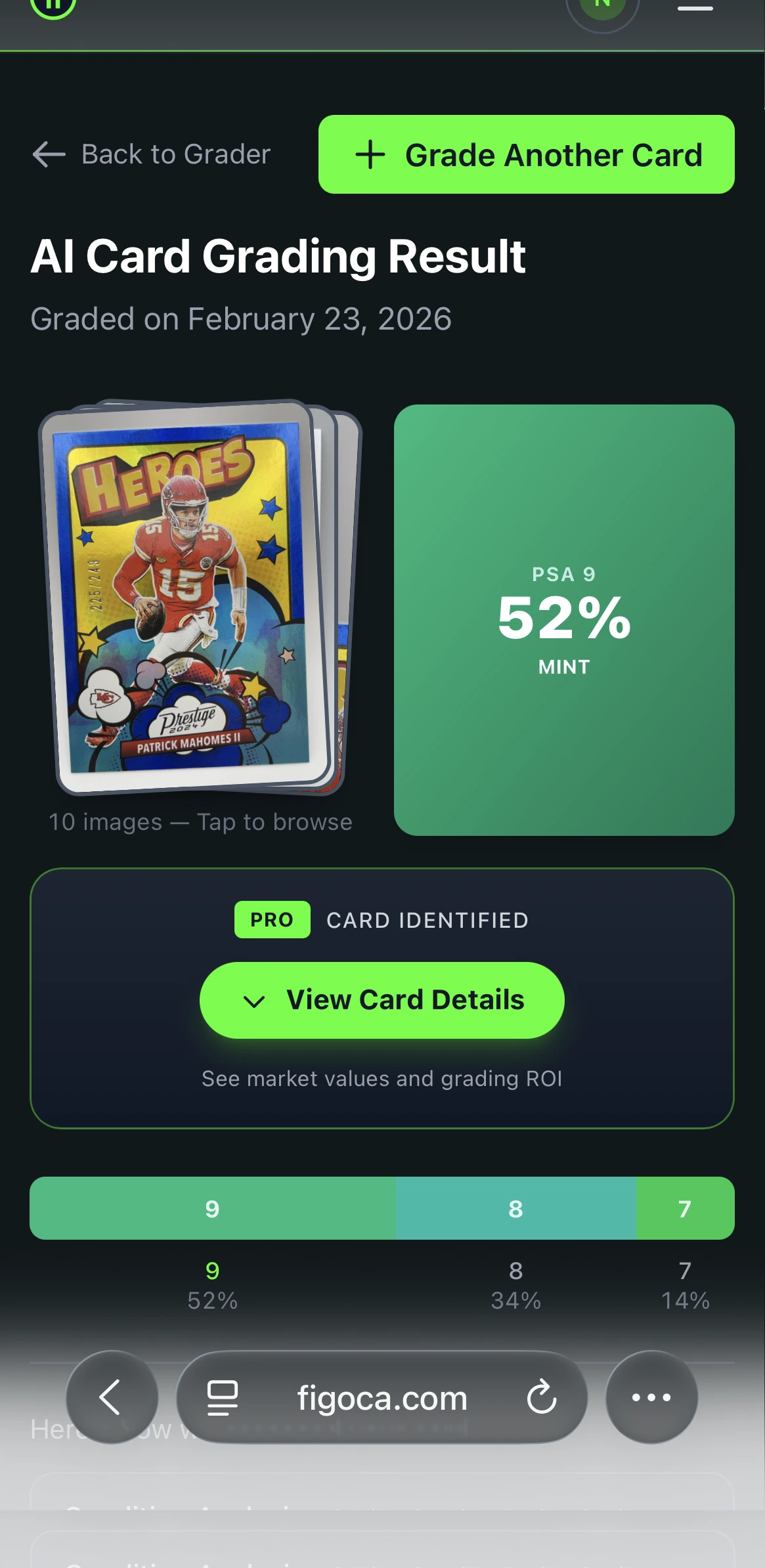
- AI grading tools: The AI card grading app gives you a fast condition check before you buy raw or send a card to grade.
- Better fit for real hobby decisions: Buying, flipping, grading, and portfolio tracking connect more cleanly than in most single-purpose tools.
Why it ranks first:
- It uses the pricing source most collectors trust most: recent sold listings.
- It fits the real habit loop of the hobby, especially on eBay.
- It helps with condition, which many price apps ignore.
Main drawback:
- Pricing depends on current plans, so you need to check the live offer on figoca.com.
Best for:
- Collectors who buy on eBay every week
- Newcomers who want fewer bad buys
- Small sellers who need fast comps before listing
If you are also deciding whether a raw card is worth submitting, pair it with Is your card worth grading? Let AI tell you first and the EV grading calculator.
AI Card Grader
Know your card's grade before you submit
Snap a photo with your phone and get an instant AI-powered grade estimate. Check centering, corners, edges, and surface — just like the pros.
- Instant grade estimate
- Sub-grades for all 4 pillars
- Built-in ROI calculator
- Free to use
2. PriceCharting: best low-cost app for broad category coverage
PriceCharting stays strong in 2026 because it covers more than one lane. If you collect sports cards, Pokemon, comics, games, and other categories from one account, it gives you a simple home base. The paid entry point also stays cheap.
Its best feature is range. You can track lots of categories without learning a new tool for each one. For many casual to mid-level collectors, that is enough.
What stands out:
- Low-cost paid tier: The official PriceCharting Premium page lists the Collector Sub at $6/month.
- Collection tracking: You can log cards and watch value changes over time.
- Photo search and deal tools: Useful if you want a broader tracker, not just a narrow sports card tool.
- Strong category spread: Good fit for collectors who mix sports cards with Pokemon or other TCGs.
Main drawback:
- It feels more like a big price database than a tight live-buying tool. If your main job is checking a listing on eBay before you click, other tools feel faster in that moment.
Best for:
- Collectors with mixed categories
- New collectors who want one low-cost app
- Users who care more about breadth than workflow polish
3. Market Movers: best for portfolio tracking and investor-style analysis
Market Movers aims at a different kind of collector. It is not just trying to tell you what one card sold for. It wants to show how your whole collection moves over time.
That makes it strongest for people who think in positions, trends, and watchlists. If you already log buys, track profit and loss, and follow price movement by sport or player, Market Movers gives you more structure than a simple price guide. Its official pricing and features page lists plans starting at $9.99/month.
What stands out:
- Portfolio tools: Collection tracking, transaction logging, and profit and loss views.
- Alerts and market pulse tools: Good for users who watch sectors, not just single cards.
- Trend tools: Helpful when you want to see who or what is moving, not just what sold yesterday.
- Strong card and sealed box coverage: Better fit for people who track both singles and product.
Main drawback:
- The workflow can feel heavy if you just want a fast comp check. It also gets expensive fast once you want larger collection limits or deeper tools.
Best for:
- Investors
- Large collection owners
- Sellers who track price movement across many cards
4. SportsCardsPro: best free sports card price guide
SportsCardsPro fills a simple role well. You want a sports card price guide. You want it fast. You do not want to pay right away. That is where it works.
It also has more tools than many collectors expect, including a photo search, deal scanner, collection tracker, and centering calculator. For a free sports-first option, that is useful value. The official SportsCardsPro site shows the core guide and tool set without a paid barrier.
What stands out:
- Free core access: Easy to recommend to beginners.
- Sports-only focus: Cleaner if you do not care about wider TCG coverage.
- Useful bonus tools: Deal scanner, lot calculator, and centering calculator all help in practical ways.
- Good first stop for a quick range: Helpful when you want orientation before deeper comp work.
Main drawback:
- It is strongest in sports cards. If you collect a lot of Pokemon or other TCGs, PriceCharting gives you a broader home. If you live inside eBay listings, figoca gives you a faster buying workflow.
Best for:
- Budget collectors
- Sports-only collectors
- Anyone who wants a free first price check
5. COMC: best for sellers who live inside the COMC ecosystem
COMC is different from the other apps on this list. It is a marketplace first. Its pricing tools matter most if you already buy, list, and move cards there.
That focus creates a real advantage for consignment sellers. COMC can show pricing suggestions based on its own sales history and seller workflow. If COMC is already one of your main selling channels, that is useful. COMC's official Suggested Prices page says the beta subscription costs $99 for one year during the current test period.
What stands out:
- Marketplace-linked pricing: Suggested Retail Price, Suggested List Price, and Suggested Wholesale Price all connect to COMC's own sales data.
- Seller fit: Helps people who want a pricing tool inside the same place they list inventory.
- Multi-category marketplace: Sports cards, gaming cards, and non-sports all exist in one marketplace.
Main drawback:
- COMC pricing works best inside COMC. If you want the broadest possible market view across live eBay buying, auction behavior, and fast comps, this should be a supporting tool, not your only tool.
Best for:
- Consignment sellers
- COMC-heavy buyers and flippers
- Users pricing cards specifically for COMC listing strategy
How to choose the right app for your style
Pick the app that matches the way you actually collect.
Choose figoca if you buy on eBay often
If you spend most of your hobby time inside eBay search results, figoca gives you the fastest path from listing to decision. That is the real job for many collectors. You are not writing a report. You are deciding whether a price is fair before someone else buys the card.
Choose PriceCharting if you collect across sports and TCGs
If your shelf has basketball, baseball, Pokemon, and maybe some comics too, PriceCharting is easier to justify than building your workflow around a sports-only tool.
Choose Market Movers if you track your collection like a portfolio
If you log buy prices, track performance, and want alerts and trend tools, Market Movers does more than a standard price guide.
Choose SportsCardsPro if you want a free sports-first tool
If you need a quick sports card range without paying up front, SportsCardsPro is the cleanest entry point on this list.
Choose COMC if you sell through COMC
If COMC already sits in your selling stack, its pricing tools can help you set better list prices and move cards faster inside that marketplace.
What makes a great trading card price tracking app?
A great app does four jobs well:
- It uses real sold data: asking prices waste your time.
- It matches the exact card: year, set, card number, grade, and variation all matter.
- It fits your workflow: buying, selling, grading, and tracking are different jobs.
- It saves time, not just screens: more features do not help if the app slows you down.
That last point gets missed a lot. A big dashboard can look impressive. If it does not help you comp a card faster or avoid a bad buy, it is decoration.
Common mistakes to avoid when picking a price tracking app
Trusting one source for every card
No single app sees the whole market equally well. Use the tool that matches the card and the moment. A COMC pricing view is useful for COMC. An eBay-first workflow is better for eBay.
Ignoring raw versus graded separation
A raw card and a PSA 10 are not the same product. Good apps help you see that difference clearly. If you need a grading decision framework, read how to select cards to submit for grading.
Paying for advanced tools you never use
Many collectors do not need portfolio dashboards, export tools, or deep trend reports. Start with the job you do most often. Then pay for the upgrade that saves you time.
Skipping condition
Price guides help. Condition moves the final number. Before you trust a raw-card comp, use the figoca AI card grading app or your own condition checklist. If you buy slabs, keep this fake PSA slab check close.
My recommendation for most collectors
If you want one clear answer, pick figoca.
It gives most collectors the best mix of live buying help, sold-listing context, category coverage, and grading support. It also fits the way the hobby works in real life. Most collectors are not running reports all day. They are checking a card, comparing the market, and trying to avoid overpaying.
If you want the lowest-cost broad tracker, choose PriceCharting. If you want a portfolio dashboard, choose Market Movers. If you want a free sports card guide, start with SportsCardsPro. If you sell inside COMC, keep COMC in the stack.
figoca extension
Get card comps on eBay in seconds
See comps directly on eBay listings and search results. Save time, avoid overpaying, and learn faster while you browse.
- Comps inline on item and search pages
- Automatic card detection and parsing
- Fast, privacy-first, and free
- Built for newcomers and hobbyists
FAQ
Sources
- figoca extension guide
- PriceCharting Premium
- Market Movers pricing and features
- SportsCardsPro home page
- COMC Suggested Prices
- eBay completed listings
Last updated: 2026-03-21

Card enthusiast, figoca founder, and independent software developer
Nico is a card enthusiast who built figoca after running into the same problems many collectors face: uncertain pre-grading decisions, too much tab switching for comps, and no fast way to price cards on the go. He is also a big Kansas City Chiefs fan (❤️💛), follows the Kansas City Royals (💙), and enjoys Formula 1 and Golf.
- Sports Card enthusiast
- Founder of figoca
- Independent software developer with a TypeScript and AWS background