figoca Extension 4.0.0: Graded values and a grading verdict
figoca 4.0.0: The biggest update to the extension so far. Every raw card on eBay now shows what it sells for graded. Update now in the Chrome Web Store.
The biggest update to the extension so far. Every raw card on eBay now shows what it sells for graded, a grading check tells you whether grading actually pays off at the listing price, and sold comps and grading live together in one side panel. On ebay.de everything is in euros.
What's new
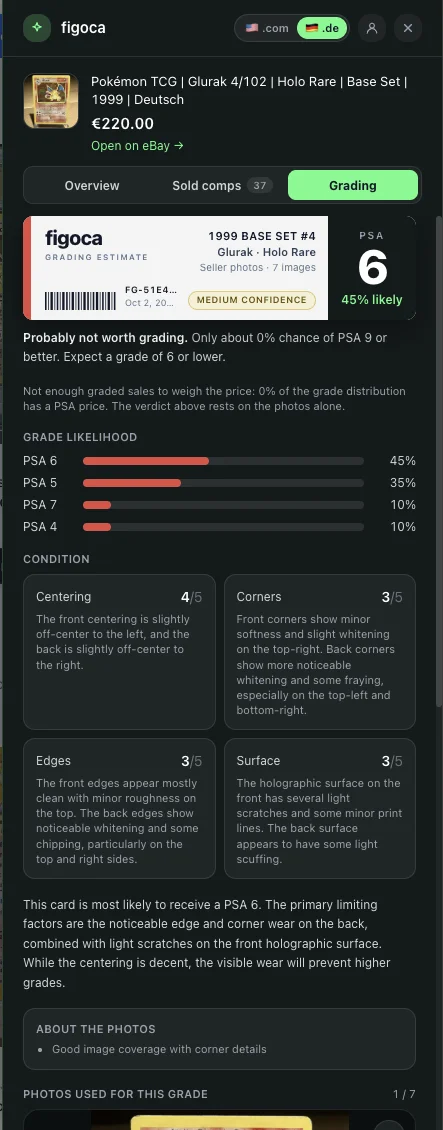
- One panel for comps and grading: the strip on each search card, the Check Grading button and the value card on the item page all open the same side panel with three tabs. Overview sums the card up at a glance: the price check against recent sales, the grading verdict and the value if graded. Sold comps holds everything from the old analysis window (stats, tabs, filters, exclusions and the deal rating). Grading holds everything from the old grading window: the figoca label, grade likelihood, the four condition scores with their notes, the photo notes and the photos the grade is based on.
- Value if graded: raw listings show what the same card recently sold for as PSA 10, PSA 9 and PSA 8, plus BGS 9.5 and BGS 9 as market data. Each row shows how far that is above or below the listing price and what is left after the grading fee, so you can see at a glance which grade makes the card worth buying. On the search page the headline value sits in the listing strip, on the item page in a card right under the price.
- Price check on the item page: the card under the price opens with the same deal rating as the search strip, and has the room to say why: the listing price next to what the card usually sells for, a bar showing where the listing sits among recent sales, and how many sales back it up. It stays up for cards with no graded sales yet, so the price check is never lost. One button, Show details, opens the side panel with the sold comps, the graded values and the grading check; once the card has been graded, the verdict joins the card.
- Worth grading verdict: once a card has been graded from the seller's photos, figoca weighs the grade odds against those sold prices, the listing price and the grading fee. Three numbers back the verdict: the expected value after grading (the sold prices weighted by how likely each grade is), the expected net after buying the card and paying the fee, and the chance of a profit. The verdict reads worth grading, borderline or not worth grading at this price, and says when some grades have too few recent sales to price.
- Your grading fee: pick the grading service and tier the maths should use (PSA, BGS or SGC). On auto, figoca picks the cheapest tier that covers what the card is worth in the grades it can plausibly get, and remembers your choice.
- Look closer at the photos: a magnifier on the photos the grade is based on and on each recent sale in the Overview opens the picture full size in a viewer. Arrow keys and buttons step through the seller's photos, Escape or a click outside closes it.
- Comps follow the eBay site: on ebay.de you get sold comps from ebay.de in euros, on ebay.com from ebay.com in dollars. Prefer one market everywhere? Switch it in the panel header or the popup; figoca remembers the choice on your account, so the web app and the mobile app use it too.
See it in action
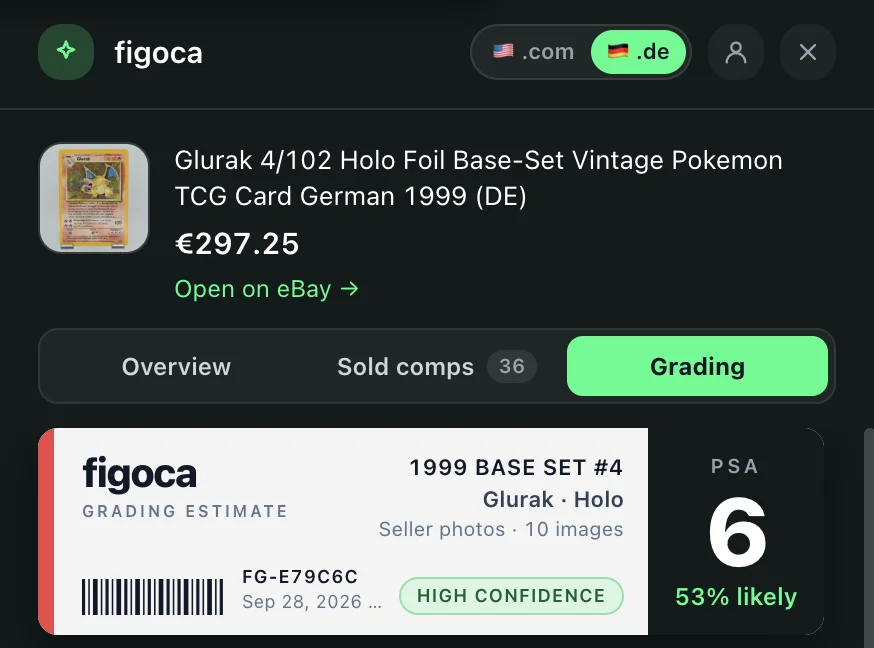 The new side panel on an ebay.de listing with the market toggle, the Overview, Sold comps and Grading tabs and the figoca grading label
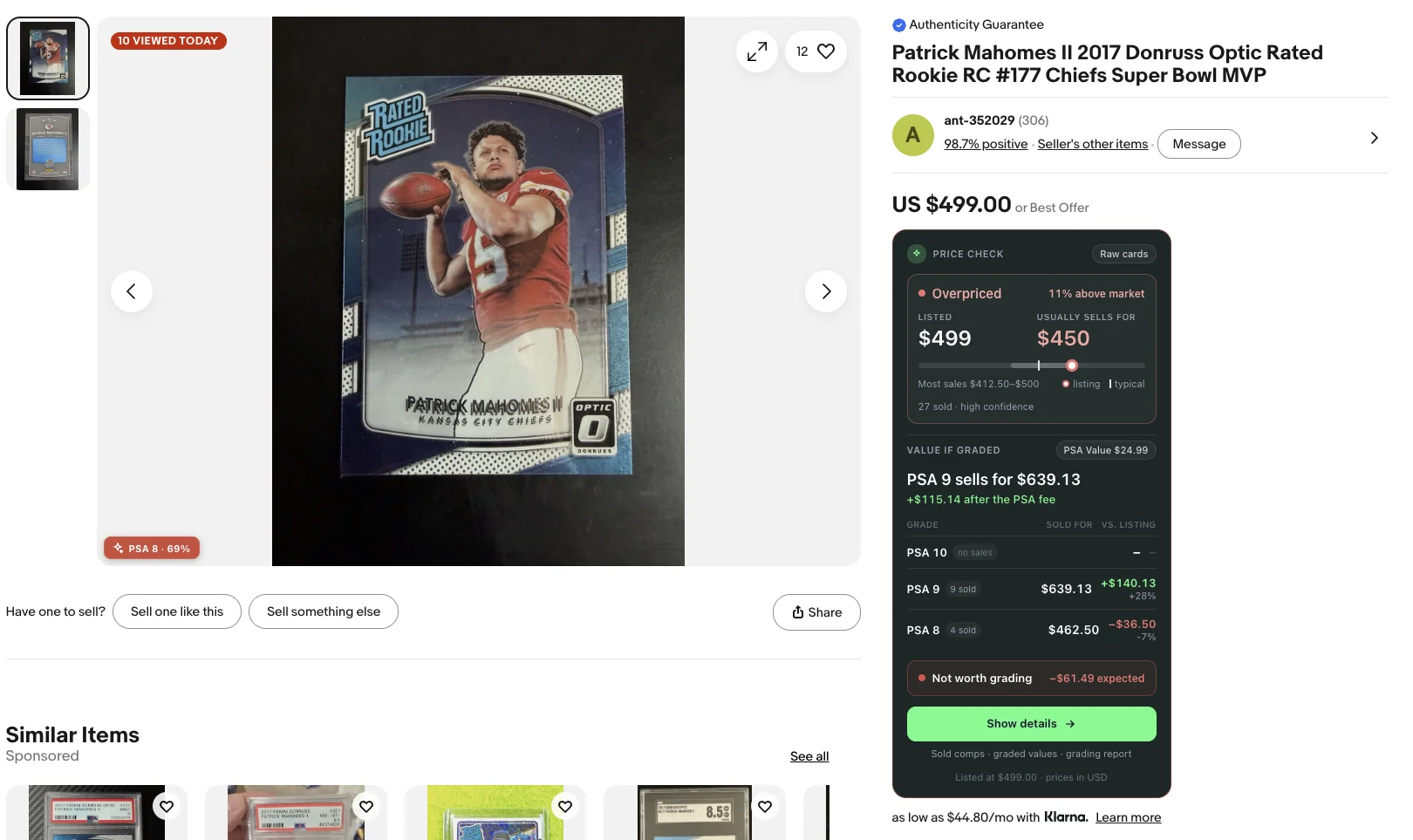 The value card under an eBay item price with the PSA 10, 9 and 8 prices and the net after the grading fee
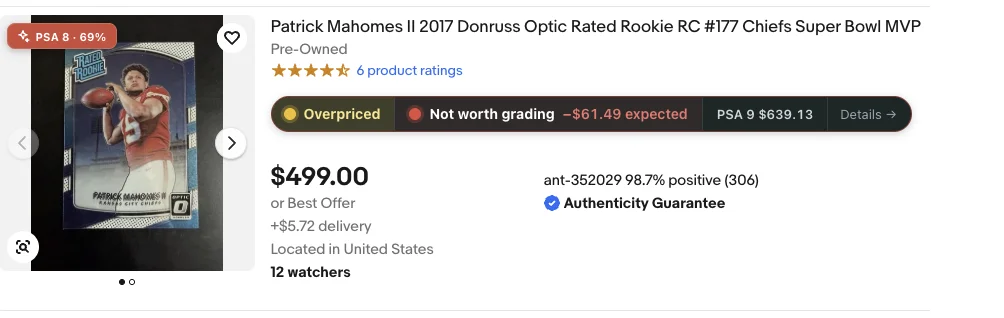 The strip on a search result with deal rating, graded value and verdict
Fixes
- Grading fee on valuable cards: the automatic fee tier was chosen against the card's PSA 10 price even when the photos pointed to a much lower grade, so a vintage card headed for a PSA 6 was costed with the $599 Walk-Through tier and looked like a certain loss. After a grading check the tier now follows the grades the card can plausibly get.
- Sold comps on ebay.de: German listings came back with no comps at all. Two causes: the bundle filter treated every "Base Set" card as a lot, and the padded titles German sellers write ("... Vintage TCG Card German 1999 (DE)") match nothing on eBay's sold search. Base-set cards now count as single cards on every market, and when a title finds nothing figoca retries with the fluff stripped.
- Magic-link sign-in: after clicking the email link the browser no longer flashes a "site can't be reached" page on its way to eBay. The figoca page hands the session straight to the extension.
- Cheap cards rated as strong deals: sold prices under $10 were read a hundred times too high (a $2.99 sale counted as $299), so a card listed at a dollar or two could show a market value in the hundreds and a "Strong Deal" badge, and "Most sales" ranges ran far past what the card ever sold for. Every sold price is now read as it is; deal ratings, market values and sales ranges on the search page, the item page and the panel all follow.
- Side panel on the item page: opened from a listing page, the panel showed older comps from the figoca archive while the same card on the search page got today's sold prices. It now loads the live sold comps the same way, with the region filter and the "sign in to eBay" hint, and the Overview offers "Grade this card" right away instead of waiting on the seller's photos.
- eBay dialogs on listing pages: with figoca installed, Make offer, Buy It Now and Add to cart on an item page could do nothing at all: eBay fades its dialogs in while they are still marked hidden, and a rule from the extension's stylesheet kept them hidden for good. The extension no longer overrides how eBay shows its own dialogs.
- Full titles in the sold comps: each recent sale in the panel now shows its whole eBay title instead of cutting it off after one line, so you can tell whether a comp really is the same card as the listing.
Other changes
- The deal pill on search cards is now a strip: the deal rating on the left, the graded value in the middle and, after grading, the verdict. Graded listings keep just the deal rating.
- All prices follow the comps market: the strip, the value card and every tab of the panel, including the expected value, expected net, listing price and grading fee on the Grading tab, are in euros on ebay.de and in dollars on ebay.com. A listing priced in another currency shows both, and the currency toggle in the panel header switches every amount at once.
- The panel closes with Escape wherever the focus is, and the strip no longer pushes a search result wider than its card.
Get the update
Chrome installs extension updates on its own, usually within a few hours. To get 4.0.0 right away, open chrome://extensions, switch on Developer mode and click Update.
Not using figoca on eBay yet? Add it from the Chrome Web Store or read how the extension works. Every release is listed in the extension changelog and shown in the extension after it updates.

Card enthusiast, figoca founder, and independent software developer
Nico is a card enthusiast who built figoca after running into the same problems many collectors face: uncertain pre-grading decisions, too much tab switching for comps, and no fast way to price cards on the go. He is also a big Kansas City Chiefs fan (❤️💛), follows the Kansas City Royals (💙), and enjoys Formula 1 and Golf.
- Sports Card enthusiast
- Founder of figoca
- Independent software developer with a TypeScript and AWS background